Update April 2020: You probably don’t need to do it this way any more. Swashbuckle.AspNetCore supports request examples via XML comments. See my blog post.
Update May 4th 2017: I have created a new NuGet package called Swashbuckle.Examples which contains the functionality I previously described in this blog post. The code lives on GitHub.
I have also created a .NET Standard version of the NuGet package at Swashbuckle.AspNetCore.Filters, which is also on GitHub.
Swashbuckle is a tool for generating Swagger, the API description language, from your ASP.NET Web Api solution.
Using Swashbuckle, which provides Swagger-UI, you can create pretty living documentation of your web api, like this:
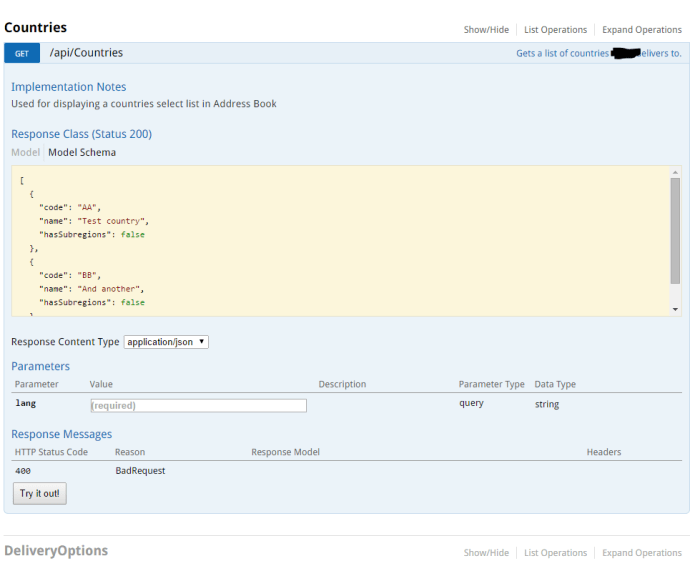
Documenting the Response
In this post I am going to show you how to document the Response, and a new way to generate some response examples.
You can specify the type of response for Swashbuckle a number of ways. Consider a simple API endpoint which returns a list of Countries:
public class CountriesController : DefaultController
{
    [HttpGet]
    public async Task<HttpResponseMessage> Get()
    {
        var resource = new List<Country>
        {
            new Country {Code = "AR", Name = "Argentina"},
            new Country {Code = "BR", Name = "Brazil"},
            // etc etc omitted for brevity
        };

        return Request.CreateResponse(HttpStatusCode.OK, resource);
    }
}
One way of describing the response code and content for Swashbuckle is using a combination of XML comments, and the ResponseType attribute, like so:
/// <response code="200">Countries returned OK</response>
[HttpGet]
[ResponseType(typeof(IEnumerable<Country>))]
public async Task<HttpResponseMessage> Get()
{
However, this only allows for one type of response.
If your API method can return multiple types, i.e. in the case of an error, then you can use the new SwaggerResponse attribute:
[HttpGet]
[SwaggerResponse(HttpStatusCode.OK, Type=typeof(IEnumerable<Country>))]
[SwaggerResponse(HttpStatusCode.BadRequest, Type = typeof(IEnumerable<ErrorResource>))]
public async Task<HttpResponseMessage> Get(string lang)
{
The Swagger 2.0 spec allows for examples to be added to the Response. However, at time of writing Swashbuckle doesn’t support this. Fortunately Swashbuckle is extendible so here is a way of doing it.
Install my Swashbuckle.Examples NuGet package.
Decorate your methods with the new SwaggerResponseExample attribute:
[SwaggerResponse(HttpStatusCode.OK, Type=typeof(IEnumerable<Country>))]
[SwaggerResponseExample(HttpStatusCode.OK, typeof(CountryExamples))]
[SwaggerResponse(HttpStatusCode.BadRequest, Type = typeof(IEnumerable<ErrorResource>))]
public async Task<HttpResponseMessage> Get(string lang)
Now you’ll need to add an Examples class, which will implement IExamplesProvider to generate the example data
public class CountryExamples : IExamplesProvider
{
    public object GetExamples()
    {
        return new List<Country>
        {
            new Country { Code = "AA", Name = "Test Country" },
            new Country { Code = "BB", Name = "And another" }
        };
    }
}
And finally enable the ExamplesOperationFilter when you configure Swashbuckle’s startup.
configuration
    .EnableSwagger(c =>
    {
        c.OperationFilter<ExamplesOperationFilter>();
    })
    .EnableSwaggerUi();
Now that we’ve done all that, we should see the examples output in our swagger.json file, which you can get to by starting your solution and navigating to /swagger/docs/v1.
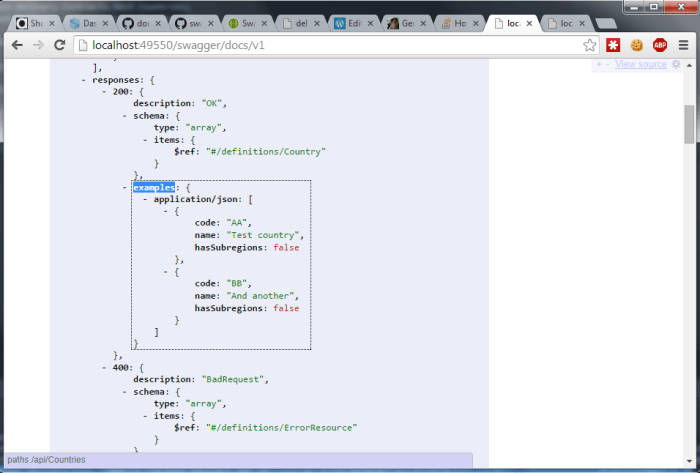
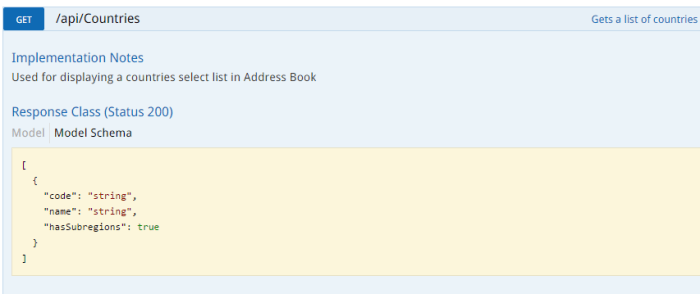
And then, when you browse the swagger-ui at /swagger/ui/index, instead of an autogenerated example like this:
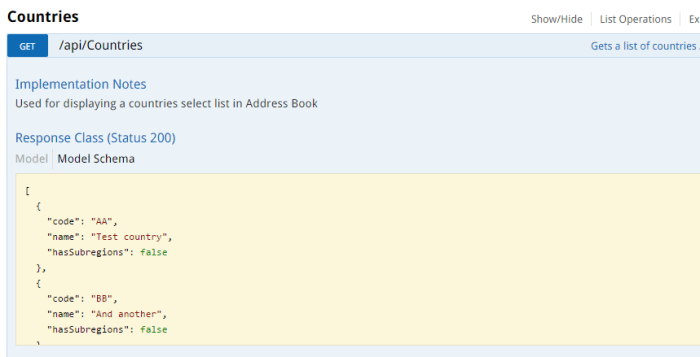
You’ll see your desired example, like this:
Be sure to check out Part 2, where we again use Swashbuckle to generate example requests.


 Matt's work blog