Make yourself an admin in SQL Server 2008

The same colleague I was helping with their SQL install yesterday made another mistake. She mustn’t have set herself to be the db admin, because we’d get “Access denied” messages when she’d try to connect to her local db using SQL Server Management Studio.

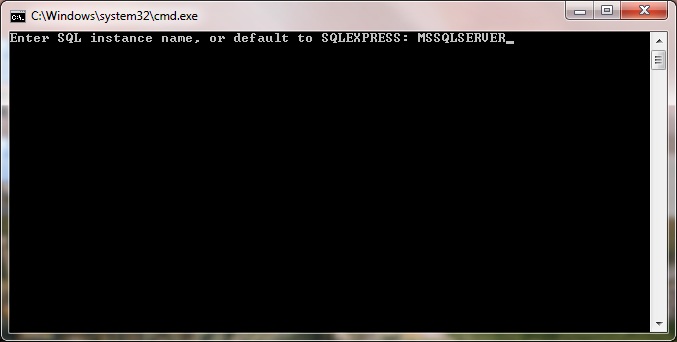
Fortunately she found this script by Ward Beattie which fixes the problem. She only had to enter MSSQLSERVER as the SQL instance name.

SQL Server 2008 install requires Visual Studio 2008 SP1

I was helping a colleague setup their new Windows 7 developer box today, and we couldn’t install SQL Server 2008. SQL Server’s installation would complain:

A previous release of Microsoft Visual Studio 2008 is installed on this computer. Upgrade Microsoft Visual Studio 2008 to the SP1 before installing SQL Server 2008.

Well, we’d already installed Visual Studio 2008 and Visual Studio 2008 SP1 so why wasn’t it working? Even after a reboot Visual Studio 2008 was reporting that SP1 was already installed.

In the end we had to install VS 2008 SP1 a second time, and after that the SQL Server install worked fine.

What went wrong? The developer had started to install SQL Server 2008 while VS 2008 SP1 was still being installed.

Send an AS2 message with .NET

UPDATE Jan 2011: I’ve written a post about receiving AS2 messages.

A recent project at work required us to generate and send AS2 (Applicability Statement 2) messages. A colleague had written a project years ago using .NET 1.1 and a COM dll for encryption, so I set about porting that to Visual Studio 2008 and .NET 3.5.

I also wanted to use .NET’s System.Security libraries for encryption instead of having to use reflection to call the old COM dll.

It was quite difficult to get the signing and encryption working – in the end I had to resort to reverse engineering, by getting BizTalk to send an AS2 message and intercepting the message content with Fiddler, so that I could see how the AS2 messages and their headers were supposed to look.

Here’s some code which constructs an AS2 message and sends it over HTTP:

using System;
using System.IO;
using System.Net;

namespace WebTestPlugins.AS2Helpers
{
    public struct ProxySettings
    {
        public string Name;
        public string Username;
        public string Password;
        public string Domain;
    }

    public class AS2Send
    {
        public static HttpStatusCode SendFile(Uri uri, string filename, byte[] fileData, string from, string to, ProxySettings proxySettings, int timeoutMs, string signingCertFilename, string signingCertPassword, string recipientCertFilename)
        {
            if (String.IsNullOrEmpty(filename)) throw new ArgumentNullException("filename");

            if (fileData.Length == 0) throw new ArgumentException("filedata");

            byte[] content = fileData;

            //Initialise the request
            HttpWebRequest http = (HttpWebRequest)WebRequest.Create(uri);
           
            if (!String.IsNullOrEmpty(proxySettings.Name))
            {
                 WebProxy proxy = new WebProxy(proxySettings.Name);
               
                NetworkCredential proxyCredential = new NetworkCredential();
                proxyCredential.Domain = proxySettings.Domain;
                proxyCredential.UserName = proxySettings.Username;
                proxyCredential.Password = proxySettings.Password;

                proxy.Credentials = proxyCredential;
               
                http.Proxy = proxy;
            }

            //Define the standard request objects
            http.Method = "POST";

            http.AllowAutoRedirect = true;

            http.KeepAlive = true;

            http.PreAuthenticate = false; //Means there will be two requests sent if Authentication required.
            http.SendChunked = false;

            http.UserAgent = "MY SENDING AGENT";

            //These Headers are common to all transactions
            http.Headers.Add("Mime-Version", "1.0");
            http.Headers.Add("AS2-Version", "1.2"); 

            http.Headers.Add("AS2-From", from);
            http.Headers.Add("AS2-To", to);
            http.Headers.Add("Subject", filename + " transmission.");
            http.Headers.Add("Message-Id", "<AS2_" + DateTime.Now.ToString("hhmmssddd") + ">");
            http.Timeout = timeoutMs;

            string contentType = (Path.GetExtension(filename) == ".xml") ? "application/xml" : "application/EDIFACT";

            bool encrypt = !string.IsNullOrEmpty(recipientCertFilename);
            bool sign = !string.IsNullOrEmpty(signingCertFilename);

            if (!sign && !encrypt)
            {
                http.Headers.Add("Content-Transfer-Encoding", "binary");
                http.Headers.Add("Content-Disposition", "inline; filename=\"" + filename + "\"");
            }
            if (sign)
            {
                // Wrap the file data with a mime header
                content = AS2MIMEUtilities.CreateMessage(contentType, "binary", "", content);

                content = AS2MIMEUtilities.Sign(content, signingCertFilename, signingCertPassword, out contentType);

                http.Headers.Add("EDIINT-Features", "multiple-attachments");

            }
            if (encrypt)
            {
                if (string.IsNullOrEmpty(recipientCertFilename))
                {
                    throw new ArgumentNullException(recipientCertFilename, "if encrytionAlgorithm is specified then recipientCertFilename must be specified");
                }

                byte[] signedContentTypeHeader = System.Text.ASCIIEncoding.ASCII.GetBytes("Content-Type: " + contentType + Environment.NewLine);
                byte[] contentWithContentTypeHeaderAdded = AS2MIMEUtilities.ConcatBytes(signedContentTypeHeader, content);

                content = AS2Encryption.Encrypt(contentWithContentTypeHeaderAdded, recipientCertFilename, EncryptionAlgorithm.DES3);
               

                contentType = "application/pkcs7-mime; smime-type=enveloped-data; name=\"smime.p7m\"";
            }
           
            http.ContentType = contentType;           
            http.ContentLength = content.Length;

            SendWebRequest(http, content);

            return HandleWebResponse(http);
        }

        private static HttpStatusCode HandleWebResponse(HttpWebRequest http)
        {
            HttpWebResponse response = (HttpWebResponse)http.GetResponse();
           
            response.Close();
            return response.StatusCode;
        }

        private static void SendWebRequest(HttpWebRequest http, byte[] fileData)
        {
            Stream oRequestStream = http.GetRequestStream();
            oRequestStream.Write(fileData, 0, fileData.Length);
            oRequestStream.Flush(); 
            oRequestStream.Close();
        }
    }
}

And here’s the code which signs and/or encrypts the message:

using System;
using System.Security.Cryptography.Pkcs;
using System.Security.Cryptography.X509Certificates;

namespace WebTestPlugins.AS2Helpers
{
    public static class EncryptionAlgorithm
    {
        public static string DES3 = "3DES";
        public static string RC2 = "RC2";
    }

    public class AS2Encryption
    {
        internal static byte[] Encode(byte[] arMessage, string signerCert, string signerPassword)
        {
            X509Certificate2 cert = new X509Certificate2(signerCert, signerPassword);
            ContentInfo contentInfo = new ContentInfo(arMessage);

            SignedCms signedCms = new SignedCms(contentInfo, true); // <- true detaches the signature
            CmsSigner cmsSigner = new CmsSigner(cert);

            signedCms.ComputeSignature(cmsSigner);
            byte[] signature = signedCms.Encode();

            return signature;
        }

        internal static byte[] Encrypt(byte[] message, string recipientCert, string encryptionAlgorithm)
        {
            if (!string.Equals(encryptionAlgorithm, EncryptionAlgorithm.DES3) && !string.Equals(encryptionAlgorithm, EncryptionAlgorithm.RC2))
                throw new ArgumentException("encryptionAlgorithm argument must be 3DES or RC2 - value specified was:" + encryptionAlgorithm);

            X509Certificate2 cert = new X509Certificate2(recipientCert);

            ContentInfo contentInfo = new ContentInfo(message);

            EnvelopedCms envelopedCms = new EnvelopedCms(contentInfo,
                new AlgorithmIdentifier(new System.Security.Cryptography.Oid(encryptionAlgorithm))); // should be 3DES or RC2

            CmsRecipient recipient = new CmsRecipient(SubjectIdentifierType.IssuerAndSerialNumber, cert);

            envelopedCms.Encrypt(recipient);

            byte[] encoded = envelopedCms.Encode();

            return encoded;
        }

        internal static byte[] Decrypt(byte[] encodedEncryptedMessage, out string encryptionAlgorithmName)
        {
            EnvelopedCms envelopedCms = new EnvelopedCms();

            // NB. the message will have been encrypted with your public key.
            // The corresponding private key must be installed in the Personal Certificates folder of the user
            // this process is running as.
            envelopedCms.Decode(encodedEncryptedMessage);

            envelopedCms.Decrypt();
            encryptionAlgorithmName = envelopedCms.ContentEncryptionAlgorithm.Oid.FriendlyName;

            return envelopedCms.Encode();
        }

    }
}

For completeness you’ll also need the AS2MimeUtilities class. Disclaimer: I didn’t write this class, it’s legacy hungarian-notated goodness.

using System;
using System.Text;

namespace WebTestPlugins.AS2Helpers
{
    /// <summary>
    /// Contains a number of useful static functions for creating MIME messages.
    /// </summary>
    public class AS2MIMEUtilities
    {
        public const string MESSAGE_SEPARATOR = "\r\n\r\n";
        public AS2MIMEUtilities()
        {
        }

        /// <summary>
        /// return a unique MIME style boundary
        /// this needs to be unique enought not to occur within the data
        /// and so is a Guid without - or { } characters.
        /// </summary>
        /// <returns></returns>
        protected static string MIMEBoundary()
        {
            return "_" + Guid.NewGuid().ToString("N") + "_";
        }

        /// <summary>
        /// Creates the a Mime header out of the components listed.
        /// </summary>
        /// <param name="sContentType">Content type</param>
        /// <param name="sEncoding">Encoding method</param>
        /// <param name="sDisposition">Disposition options</param>
        /// <returns>A string containing the three headers.</returns>
        public static string MIMEHeader(string sContentType, string sEncoding, string sDisposition)
        {
            string sOut = "";

            sOut = "Content-Type: " + sContentType + Environment.NewLine;
            if (sEncoding != "" )
                sOut += "Content-Transfer-Encoding: " + sEncoding + Environment.NewLine;

            if (sDisposition != "" )
                sOut += "Content-Disposition: " + sDisposition + Environment.NewLine;

            sOut = sOut + Environment.NewLine;

            return sOut;
        }

        /// <summary>
        /// Return a single array of bytes out of all the supplied byte arrays.
        /// </summary>
        /// <param name="arBytes">Byte arrays to add</param>
        /// <returns>The single byte array.</returns>
        public static byte[] ConcatBytes(params byte[][] arBytes)
        {
            long lLength = 0;
            long lPosition = 0;

            //Get total size required.
            foreach(byte[] ar in arBytes)
                lLength += ar.Length;

            //Create new byte array
            byte[] toReturn = new byte[lLength];
               
            //Fill the new byte array
            foreach(byte[] ar in arBytes)
            {
                ar.CopyTo(toReturn,lPosition);
                lPosition += ar.Length;
            }

            return toReturn;
        }

        /// <summary>
        /// Create a Message out of byte arrays (this makes more sense than the above method)
        /// </summary>
        /// <param name="sContentType">Content type ie multipart/report</param>
        /// <param name="sEncoding">The encoding provided...</param>
        /// <param name="sDisposition">The disposition of the message...</param>
        /// <param name="abMessageParts">The byte arrays that make up the components</param>
        /// <returns>The message as a byte array.</returns>
        public static byte[] CreateMessage(string sContentType, string sEncoding, string sDisposition, params byte[][] abMessageParts)
        {
            int iHeaderLength=0;
            return CreateMessage(sContentType, sEncoding, sDisposition, out iHeaderLength, abMessageParts);
        }
        /// <summary>
        /// Create a Message out of byte arrays (this makes more sense than the above method)
        /// </summary>
        /// <param name="sContentType">Content type ie multipart/report</param>
        /// <param name="sEncoding">The encoding provided...</param>
        /// <param name="sDisposition">The disposition of the message...</param>
        /// <param name="iHeaderLength">The length of the headers.</param>
        /// <param name="abMessageParts">The message parts.</param>
        /// <returns>The message as a byte array.</returns>
        public static byte[] CreateMessage(string sContentType, string sEncoding, string sDisposition, out int iHeaderLength, params byte[][] abMessageParts)
        {
            long lLength = 0;
            long lPosition = 0;

            //Only one part... Add headers only...
            if (abMessageParts.Length==1)
            {
                byte[] bHeader = ASCIIEncoding.ASCII.GetBytes(MIMEHeader(sContentType, sEncoding, sDisposition));
                iHeaderLength = bHeader.Length;
                return ConcatBytes(bHeader, abMessageParts[0]);
            }
            else
            {
                // get boundary and "static" subparts.
                string sBoundary = MIMEBoundary();
                byte[] bPackageHeader = ASCIIEncoding.ASCII.GetBytes(MIMEHeader(sContentType + "; boundary=\"" + sBoundary + "\"", sEncoding, sDisposition));
                byte[] bBoundary = ASCIIEncoding.ASCII.GetBytes(Environment.NewLine + "--" + sBoundary + Environment.NewLine);
                byte[] bFinalFooter = ASCIIEncoding.ASCII.GetBytes(Environment.NewLine + "--" + sBoundary + "--" + Environment.NewLine);

                //Calculate the total size required.
                iHeaderLength = bPackageHeader.Length;

                foreach(byte[] ar in abMessageParts)
                    lLength += ar.Length;
                lLength += iHeaderLength + bBoundary.Length*abMessageParts.Length +
                    bFinalFooter.Length;

                //Create new byte array to that size.
                byte[] toReturn = new byte[lLength];
               
                //Copy the headers in.
                bPackageHeader.CopyTo(toReturn, lPosition);
                lPosition += bPackageHeader.Length;

                //Fill the new byte array in by coping the message parts.
                foreach(byte[] ar in abMessageParts)
                {
                    bBoundary.CopyTo(toReturn, lPosition);
                    lPosition += bBoundary.Length;

                    ar.CopyTo(toReturn,lPosition);
                    lPosition += ar.Length;
                }

                //Finally add the footer boundary.
                bFinalFooter.CopyTo(toReturn, lPosition);

                return toReturn;
            }
        }

        /// <summary>
        /// Signs a message and returns a MIME encoded array of bytes containing the signature.
        /// </summary>
        /// <param name="arMessage"></param>
        /// <param name="bPackageHeader"></param>
        /// <returns></returns>
        public static byte[] Sign(byte[] arMessage, string signerCert, string signerPassword, out string sContentType)
        {
            byte[] bInPKCS7 = new byte[0];

            // get a MIME boundary
            string sBoundary = MIMEBoundary();

            // Get the Headers for the entire message.
            sContentType = "multipart/signed; protocol=\"application/pkcs7-signature\"; micalg=\"sha1\"; boundary=\"" + sBoundary + "\"";
           
            // Define the boundary byte array.
            byte[] bBoundary = ASCIIEncoding.ASCII.GetBytes(Environment.NewLine + "--" + sBoundary + Environment.NewLine);
               
            // Encode the header for the signature portion.
            byte[] bSignatureHeader = ASCIIEncoding.ASCII.GetBytes(MIMEHeader("application/pkcs7-signature; name=\"smime.p7s\"", "base64", "attachment; filename=smime.p7s"));
   
            // Get the signature.
            byte[] bSignature = AS2Encryption.Encode(arMessage, signerCert, signerPassword);
           
            // convert to base64
            string sig = Convert.ToBase64String(bSignature) + MESSAGE_SEPARATOR;
            bSignature = System.Text.ASCIIEncoding.ASCII.GetBytes(sig);

            // Calculate the final footer elements.
            byte[] bFinalFooter = ASCIIEncoding.ASCII.GetBytes("--" + sBoundary + "--" + Environment.NewLine);

            // Concatenate all the above together to form the message.
            bInPKCS7 = ConcatBytes(bBoundary, arMessage, bBoundary,
                bSignatureHeader, bSignature, bFinalFooter);

            return bInPKCS7;
        }
    }
}

Anyway, I hope this helps someone out there because I couldn’t find a sample of how to send an AS2 message in .NET.

Speeding up my Wi-Fi b/g network at home

I was trying to watch recorded HD content from my HTPC on my laptop, but it would stutter and be unwatchable. I quickly realised that my wireless network was too slow.

So to diagnose the problem I tried copying a large (2 Gb) file across my wireless network and see what sort of speeds I was getting. Only around 700Kb/second! Hmm, that seems awfully slow.

I opened up my router’s config page (Linksys WRT54GL using the patched tomato firmware) and tried the usual suspects – 1. changing to a different channel; 2. moving the router away from possible sources of interference; 3. trying a USB wireless network adaptor I had lying around instead of my laptop’s built in wireless, all to no avail. I was still only getting around 700Kb/sec.

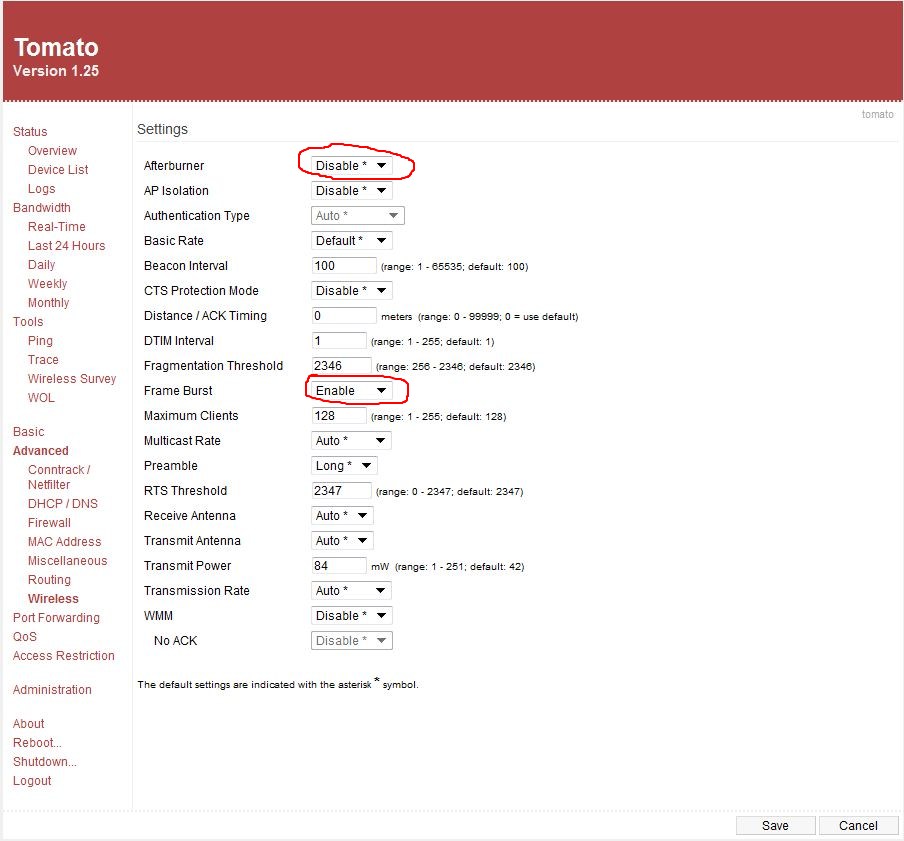
I went into the router’s Advanced settings page and had a look at the options in there. Hmm, let’s try disabling this Afterburner setting. Boom! Once that was disabled the file copy went up to 2Mb/sec. That setting is disabled by default, but I had enabled it when I first setup my router (a year ago) thinking it would probably make things faster. Well that wasn’t the case, it was slowing things down.

I then tinkered with a few other settings, and I found that enabling Frame Burst sped things up a little bit, to around 2.5Mb/sec.

So yay, now I can watch recorded shows over my Wi-Fi g network! I don’t need to buy a 802.11n router and USB adaptor :-)

Moral of the story, which applies to all technology really – stick with the default settings to begin with, and once you know your baseline then tinker.

A member of the db_owner role must use… error in Visual Studio 2010

I keep getting this error message pop up in Visual Studio – “A member of the db_owner role must use the Visual Studio database diagramming functionality in order to set up the required database diagramming objects on the SQL Server.”

Typically it would happen whenever I drag a table from the Server Explorer onto the LINQ To Sql designer dbml. The error displays, and then after that the Server Explorer window locks up with the Windows 7 hourglass aka the toilet bowl. I can keep using Visual Studio but I can’t do anything in Server Explorer so I eventually have to restart Visual Studio 2010.

I was a bit confused because 1. I’m a dbo, and 2. I’d already setup diagramming in SQL Server Management Studio 2008.

I eventually realised – the solution I’m working on has two DB connections in Server Explorer – my application’s main db for settings etc (which is the one I’m working with when the error is thrown), and another read-only external database which my application reads data from. That external db doesn’t have diagramming set up yet so I presume VS is complaining about that.

There are two workarounds – 1. ask a dbo to set up diagramming on the other db, or 2. remove the connection to the other db from Server Explorer.

I did option 2, and the downside is I have to re-add the connection whenever I want to update my dbml. Fortunately I don’t have to do that very often.

Using jsTree to get a Treeview with checkboxes in ASP.NET MVC

UPDATE 17 December 2011!

After one year this is still the most popular post on my blog. However, this uses jsTree v0.9.9a2 and jsTree is now in version v1.0 which has changed completely. This post does not work with jsTree v1.0!!!

I have written a post using the latest version of jsTree here

jsTree is a jQuery plugin for creating a treeviews, and jsTree’s checkbox plugin allows you to create a treeview with tri-state checkboxes, like so:

Notice how “Origination” appears half-checked because only some of its children are checked.

Getting started

For this demo I am using ASP.NET MVC 2 and jsTree v0.9.9a2. Let’s start with a new “ASP.NET MVC 2 Web Application”, name it jsTreeDemo, and add the required jsTree files to our solution:

In the View, create a div which you want to become a treeview. I’ll name mine demoTree. Also add references to the required jQuery and jsTree scripts:

Views/Home/Index.aspx

<asp:content id="Content2" runat="server" contentplaceholderid="MainContent">
 <h2><%: ViewData["Message"] %></h2>
 <div id="demoTree">
 </div>
 <script src="../../Scripts/jquery-1.4.1.js" type="text/javascript"></script>
 <script src="../../Scripts/jquery.tree.js" type="text/javascript"></script>
 <script src="../../Scripts/plugins/jquery.tree.checkbox.js" type="text/javascript"></script>
</asp:content>

Next, create index.js, add a reference to it in Index.aspx, and add the following code:

Scripts/index.js

/// <reference path="http://ajax.microsoft.com/ajax/jQuery/jquery-1.4.1-vsdoc.js"/>

$(function () {
  $("#demoTree").tree({
   ui: {
     theme_name: "checkbox"
   },
   data: {
     type: "json",
     opts: {
       static: [
           {
              data: "Origination",
              children: [
                { data: "New Connection" },
                { data: "Disconnection" },
                { data: "Load Change" },
                { data: "Corporate" },
              ]
            },
            {
              data: "Confirm Application"
            }
       ]
     }
   },
   plugins: {
     checkbox: {}
   }
  });
});

This should create a basic treeview with checkboxes, with static data. Not very interesting yet.

Populating the tree with an AJAX request

Let’s create an ActionMethod to return some JSON data and use that data to populate our treeview. The jsTree documentation specifies how the JSON data should look but to help clarify, here’s an example:

[{"data":"Origination","attributes":{"id":"10"}",children":[
                         {"data":"New Connection","attributes":{"id":"11"}},
                         {"data":"Disconnection","attributes":{"id":"12"}},
                         {"data":"Load Change","attributes":{"id":"13"}},
                         {"data":"Corporate","attributes":{"id":"14"}}
                         ]},
{"data":"Confirm Application","attributes":{"id":"20"}}
...]

While it might be possible to write a LINQ query with anonymous types to return this data, it quickly gets rather hairy, so to simplify things let’s create a model to help us construct the data correctly. In the Models folder, add the following classes:

Models/JsTreeModel.cs

namespace jsTreeDemo.Models
{
 public class JsTreeModel
 {
   public string data;
   public JsTreeAttribute attributes;
   public JsTreeModel[] children;
 }

 public class JsTreeAttribute
 {
   public string id;
   public bool selected;
 }
}

In Controllers/HomeController.cs add the following function:

Controllers/HomeController.cs

[AcceptVerbs(HttpVerbs.Post)]
public JsonResult GetTreeData()
{
 var tree = new JsTreeModel[]
 {
   new JsTreeModel {
     data = "Origination",
     attributes = new JsTreeAttribute  { id="10"},
     children = new JsTreeModel[]
     {
       new JsTreeModel { data = "New Connection", attributes = new JsTreeAttribute { id="11"} },
       new JsTreeModel { data = "Disconnection", attributes = new JsTreeAttribute { id="12", selected=true } },
       new JsTreeModel { data = "Load Change", attributes = new JsTreeAttribute { id="13"} },
       new JsTreeModel { data = "Corporate", attributes = new JsTreeAttribute { id="14", selected=true} },
     }
   },
   new JsTreeModel {
     data = "Confirm Application",
     attributes = new JsTreeAttribute { id="20" }
   },
   new JsTreeModel {
     data = "Things",
     attributes = new JsTreeAttribute  { id="30", selected=true },
     children = new JsTreeModel[]
     {
       new JsTreeModel { data = "Thing 1", attributes = new JsTreeAttribute { id="31"} },
       new JsTreeModel { data = "Thing 2", attributes = new JsTreeAttribute { id="32"} },
       new JsTreeModel { data = "Thing 3", attributes = new JsTreeAttribute { id="33"} },
       new JsTreeModel { data = "Thing 4", attributes = new JsTreeAttribute { id="34"} },
     }
   },
   new JsTreeModel {
     data = "Colors",
     attributes = new JsTreeAttribute  { id="40"},
     children = new JsTreeModel[]
     {
       new JsTreeModel { data = "Red", attributes = new JsTreeAttribute { id="41"} },
       new JsTreeModel { data = "Green", attributes = new JsTreeAttribute { id="42"} },
       new JsTreeModel { data = "Blue", attributes = new JsTreeAttribute { id="43"} },
       new JsTreeModel { data = "Yellow", attributes = new JsTreeAttribute { id="44"} },
     }
   }
 };

 return Json(tree);
}

Now we need to change our javascript to tell it to use GetTreeData:

Scripts/index.js


  $("#demoTree").tree({
   ui: {
     theme_name: "checkbox"
   },
   data: {
     type: "json",
     opts: {
         method: "POST",
         url: "/Home/GetTreeData"
     }
   },
...

Now our tree should be populated with the same data as Figure 1.

Determining which items are checked when posting

Let’s put our tree inside a <form> and submit it.

Views/Home/Index.aspx

<asp:Content ID="Content2" ContentPlaceHolderID="MainContent" runat="server">
 <h2><%: ViewData["Message"] %></h2>

 <% using (Html.BeginForm("Submit", "Home", FormMethod.Post, new { id = "frmTree" }))
 { %>
   <div id="demoTree" style="height:300px">
   </div>
   <div>
     <input type="submit" value="Submit" id="btnSubmit" />
   </div>
 <% } %>

 <script src="../../Scripts/jquery-1.4.1.js" type="text/javascript"></script>
 <script src="../../Scripts/jquery.tree.js" type="text/javascript"></script>
 <script src="../../Scripts/plugins/jquery.tree.checkbox.js" type="text/javascript"></script>
 <script src="../../Scripts/index.js" type="text/javascript"></script>

</asp:Content>

And now let’s add the Submit method to the HomeController

Controllers/HomeController.cs

[AcceptVerbs(HttpVerbs.Post)]
 public ActionResult Submit(FormCollection form)
 {
   return View(form);
 }

and the View

Views/Home/Submit.aspx

<%@ Page Title="" Language="C#" MasterPageFile="~/Views/Shared/Site.Master" Inherits="System.Web.Mvc.ViewPage<FormCollection>" %>

<asp:Content ID="Content1" ContentPlaceHolderID="TitleContent" runat="server">
 Submit
</asp:Content>

<asp:Content ID="Content2" ContentPlaceHolderID="MainContent" runat="server">

 <h2>Submitted</h2>
 You chose:
 <% foreach (var item in Model)
    { %>
      <%: item %>
 <% } %>
</asp:Content>

If you press the Submit button, nothing will happen as nothing is passed through in the FormCollection to Submit() in HomeController. Despite appearances, the jsTree doesn’t actually render any HTML <input>s for the checkboxes. So we need to write some javascript to call jsTree’s get_checked() function to figure out which nodes are checked, and then add them to the form somehow. One way to add stuff to the form is to generate a hidden field, since hidden fields within a form are posted. This code generates hidden <input>s with the same name as each of the checked items, and adds them to the form.

Scripts/index.js

function generateHiddenFieldsForTree(treeId) {
  $.tree.plugins.checkbox.get_checked($.tree.reference("#" + treeId)).each(function () {
    var checkedId = this.id;
    $("<input>").attr("type", "hidden").attr("name", checkedId).val("on").appendTo("#" + treeId);
  });
}

and bind it to the form’s submit event:

Scripts/index.js

$(function () {
  $("#frmTree").submit(function () { generateHiddenFieldsForTree("demoTree"); });
}

Now when we submit our form, we should see the ids of the values which were checked:

What about telling the tree to pre-check some items?

So how do we render the tree with some items already checked? My colleague Paul came up with this problem and the solution. Notice how we added “public bool selected” to JsTreeAttribute? This doesn’t do anything as far as the checkboxes are concerned, but it does add a custom property called “selected” to each node’s <li>. We can use that to tell the jsTree to check the given node, by using the jsTree’s callback option.

Scripts/index.js


$("#demoTree").tree({
   ui: {
     theme_name: "checkbox"
   },
   data: {
     type: "json",
     opts: {
         method: "POST",
         url: "/Home/GetTreeData"
     }
   },
   plugins: {
     checkbox: {}
   },
   callback: {
     onload: function (tree) {
       $('li[selected=true]').each(function () {
         $.tree.plugins.checkbox.check(this);
       });
     }
   }
  });

You’ll see that the nodes that are marked with selected=true in GetTreeData() are now checked when you load the page.

Here’s a link to the solution (VS 2010) with code samples.

UPDATE 17 December 2011!

After one year this is still the most popular post on my blog. However, this uses jsTree v0.9.9a2 and jsTree is now in version v1.0 which has changed completely. This post does not work with jsTree v1.0!!!

I have written a post using the latest version of jsTree here
“You cannot write updates to the target” in Visual Studio 2010

First, the good news. Data dude is now included in Visual Studio 2010.

If you get a message “You cannot write updates to the target when you compare the specified types of schema models” when you try and import your database into a data dude project, it’s because you’ve done a schema compare of your database against a “SQL Server Data-tier Application” instead of a “SQL Server 2008 Database” project.

UPDATE: you might also get this error message if you import the schema from a SQL 2005 database into a SQL Server 2008 Database Project.

A world with free mobile calls

I haven’t posted here for a while because I just went on a month long holiday in India, which was quite an experience.

One interesting thing about India was that cellphones are everywhere and the calls are cheap. Like, real cheap. The standard rate is about 1 rupee (USD $0.02) per minute. But if you’re calling someone on the same mobile network as you, then calls are half a rupee (USD $0.01) per minute. This is cheap even for Indians – you can’t buy anything for 1 rupee in India. So it’s practically free to make a quick one minute call.

Interestingly, to send a text message is about the same price – 1 rupee. Suffice to say no one ever texts in India, since it’s quicker and easier to make a call.

So, what do you expect would happen in a world with practically free communication? Spam of course. People who’d been in India a while ignored their text messages, because the only people who ever send texts are companies spamming. Likewise, it was all too common to get calls from unknown numbers which would be a recorded advertisement.

Apparently you can request your number be added to a “do not call” list and it actually works.

Nokia N900

Only a couple of hours after posting my 2nd ever blog post here, my rant about the iPhone, some guy from WOMWorld Nokia in the UK contacted me, and asked if I’d like to try out their Nokia N900 for 2 weeks. Umm, OK!

I’ll be honest: I hadn’t heard of this phone before. I keep an eye on the tech blogs but I really only pay attention to iPhone, Android and Windows Mobile 7 news. But a quick glance at the Nokia UK website told me that the N900 is their top of the line smartphone.
N900

The Good

Like every other phone on the planet (bar one), it has an SMS length counter. Yay! It feels like a phone, with its removable battery. It has a physical QWERTY keyboard. You can run multiple apps at the same time. Its web browser is great, with accurate rendering of the sites I looked at and Flash support. Removable upgradeable microSD cards.
My brother had a play with it – he doesn’t have a smartphone, and he thought it was much easier to use than my iPhone.

The Bad

I didn’t like the build quality, it felt too plasticy. I didn’t like the resistive touchscreen, to me it felt like I had to thump it harder than I’d like to. And it wasn’t precise either, sometimes I’d click the wrong link while browsing web pages. It comes with a stylus but I kept forgetting to use that, and who wants to use a stylus anyway. The OS occasionally felt slow and not as snappy as the iPhone 3GS. It was stuck in landscape mode – no portrait mode here folks, except when making a call.
I couldn’t figure out the software suite for Windows at all. I wasn’t sure which package to download from the Nokia website, so I tried "Nokia PC suite", and that was crap. I couldn’t figure out how to load music onto the phone at all so I couldn’t try out its media abilities. The maps application was nowhere near as slick as Maps on the iPhone.

vs. the iPhone

A note about the keyboard: I always moan about the iPhone’s on screen keyboard so I thought I would love the N900s physical keyboard, but it seems like I must have gotten used to the iPhone’s keyboard because I can type twice as fast on the iPhone than on the N900.

So on paper, the N900 wins hands down – removable battery, physical keyboard, upgradeable storage, multitasking and Flash support. The iPhone is slimmer though which makes it better looking.
If you don’t already have an iPhone then the N900 is a real contender.

However, the iPhone, for all it’s weaknesses, offers a slicker overall experience, and looks way cooler even if every man and his dog has one these days. A phone has to look bling after all. And the iPhone wins because it is so much more snappy and responsive. I was happy to send the N900 back and go back to my iPhone.

AND Search using SQL Server Full Text Search

DISCLAIMER: I’m new to SQL Server Full Text Search, so if what I’m saying here is wrong then let me know.

Sticking with the Knowledge Base project, we had to implement search. We decided to use SQL Server Full Text Search for this. Once the fulltext catalogs were setup, the query my colleague wrote looked like this:

SELECT [Key], [Rank]
FROM FREETEXTTABLE(dbo.Question, QuestionText, 'building consent form', 100)

The problem with this search is that it will return results which contain any one of the keywords. So if a user enters “building consent form”, a page only needs to contain building OR consent OR form and it will be included in the results. I call this an OR search. This reminds me of the early days of search engines, (AltaVista.com et al), which used to work the same way.

AltaVista c.1999. Remember?

Back in the AltaVista days, if you wanted only pages with every search term you had to use AND between each search term e.g. [building AND consent AND form]. Nowadays you don’t need to type the ANDs; if you enter [building consent form] into Google, it will only return results which contain building, consent, and form. This is what I call an AND search.

SQL Server Full Text Search seems to be stuck in the late 1990s days of OR searches. As demonstrated above it will return a hit for any one of the search words. And there doesn’t seem to be an easy way to tell it to do an AND search.

AND Search

To do an AND search with SQL Server Full Text Search, you need to query the CONTAINSTABLE.

SELECT	[Key], [Rank], 1
FROM	CONTAINSTABLE(dbo.Question, QuestionText, '"building" AND "consent" AND "form"', 100)

Because we’re querying the CONTAINSTABLE and not the FREETEXTTABLE we lose all Full Text Search’s nice fuzziness around the search terms, i.e. in the above example, Questions which contain “buildings”, “consent”, and “form” won’t be returned. To help we can do the following:

SELECT	[Key], [Rank], 1
FROM	CONTAINSTABLE(dbo.Question, QuestionText, '"building*" AND "consent*" AND "form*"', 100)

Stop right there

Another problem with this is stopwords, aka noise words (SQL Server 2005 calls them noise words, 2008 stopwords). SQL Server has a list of around 150 common words, which are ignored by the Full Text Search engine. e.g. about, after, all, also, an, and, another etc. You can view the English stopwords in SQL Server 2008 like so:

select * from sys.fulltext_system_stopwords where language_id = 1033

In my table there is a Question titled “What are building consents?”. If we search for “what are building consents” like so:

SELECT	[Key], [Rank], 1
FROM	CONTAINSTABLE(dbo.Question, QuestionText, '"what*" AND "are*" AND "building*" AND "consents*"', 100)

because “are” is a stopword (and so is “what”) we won’t get any results!
There is a workaround – to wipe the list of stop words! The problem with doing this is that the list of stop words is setup server-wide on the SQL Server itself. In our production environment other applications are using the same SQL Server instance (but of course we have our own KnowledgeBase database), so this wasn’t an option.

Then the customer added a new requirement – if a Question contains the exact search phrase then that should be returned first. Adding the code for that use case fixes my search.

CREATE PROCEDURE dbo.Search
(
@keywords NVARCHAR(4000), — e.g. ‘”building*” AND “consent*” AND “form*”‘
@searchPhrase NVARCHAR(4000) — e.g. ‘building consent form’
)
AS
BEGIN
— Tmp table —
DECLARE @searchResults TABLE
(
QuestionID int,
Rank int,
ExactMatchToQuestionText bit default 0
)

— Question contains keywords in order —
INSERT @searchResults (QuestionID, ExactMatchToQuestionText)
SELECT QuestionID, 1
FROM Question
WHERE QuestionText LIKE ‘%’ + @searchPhrase + ‘%’

— Free Text Search matches —
INSERT @searchResults (QuestionID, Rank, ExactMatchToQuestionText)
SELECT [Key], [Rank], 0
FROM CONTAINSTABLE(dbo.Question, QuestionText, @keywords, 100)
AND [Key] not in (SELECT QuestionID from @searchResults)

— Return —
SELECT Question.*
FROM @searchResults [Results]
JOIN Question ON Results.QuestionID = Question.QuestionID
ORDER BY
Results.ExactMatchToQuestionText DESC,
Results.Rank DESC
END

Still wrong

This code still has a bug – a search for [what are building consents] returns 1 hit, but a search for [what building consents] returns 0, because “what” is a SQL Server stopword. D’oh!
At this point I am better off throwing away SQL Full Text Search and completely rolling my own query.
So why doesn’t SQL Server Full Text Search include a simple option for doing AND searches against the FREETEXTSEARCH table?
And, does anyone know a better way to do AND searches using SQL Server Full Text Search?