This is a follow on from my post from last year about Generating example Swagger responses.
Update April 2020: You probably don’t need to do it this way any more. Swashbuckle.AspNetCore supports request examples via XML comments. See my blog post.
Update May 4th 2017: I have created a new NuGet package called Swashbuckle.Examples which contains the functionality I previously described in this blog post. The code lives on GitHub.
I have also created a .NET Standard version of the NuGet package at Swashbuckle.AspNetCore.Filters, which is also on GitHub.
It can also be useful to generate example requests, and in this post I will show you how.
First, install my Swashbuckle.Examples NuGet package, or the .NET Core version Swashbuckle.AspNetCore.Filters
Now decorate your controller methods with the included SwaggerRequestExample attribute:
[Route(RouteTemplates.DeliveryOptionsSearchByAddress)]
[SwaggerRequestExample(typeof(DeliveryOptionsSearchModel), typeof(DeliveryOptionsSearchModelExample))]
[SwaggerResponse(HttpStatusCode.OK, Type = typeof(DeliveryOptionsModel), Description = "Delivery options for the country found and returned successfully")]
[SwaggerResponseExample(tHttpStatusCode.OK, typeof(DeliveryOptionsModelExample))]
[SwaggerResponse(HttpStatusCode.BadRequest, Type = typeof(ErrorsModel), Description = "An invalid or missing input parameter will result in a bad request")]
[SwaggerResponse(HttpStatusCode.InternalServerError, Type = typeof(ErrorsModel), Description = "An unexpected error occurred, should not return sensitive information")]
public async Task<IHttpActionResult> DeliveryOptionsForAddress(DeliveryOptionsSearchModel search)
{
Now implement it, in this case via a DeliveryOptionsSearchModelExample (which should implement IExamplesProvider), which will generate the example data. It should return the type you specified when you specified the [SwaggerRequestExample].
public class DeliveryOptionsSearchModelExample : IExamplesProvider
{
    public object GetExamples()
    {
        return new DeliveryOptionsSearchModel
        {
            Lang = "en-GB",
            Currency = "GBP",
            Address = new AddressModel
            {
                Address1 = "1 Gwalior Road",
                Locality = "London",
                Country = "GB",
                PostalCode = "SW15 1NP"
            },
            Items = new[]
            {
                new ItemModel
                {
                    ItemId = "ABCD",
                    ItemType = ItemType.Product,
                    Price = 20,
                    Quantity = 1,
                    RestrictedCountries = new[] { "US" }
                }
            }
        };
    }
Don’t forget to enable the ExamplesOperationFilter when you enable Swagger, as before:
configuration
    .EnableSwagger(c =>
    {
        c.OperationFilter<ExamplesOperationFilter>();
    })
    .EnableSwaggerUi();
Or if you’re using .NET Core
services.AddSwaggerGen(c =>
   {
        c.SwaggerDoc("v1", new Info { Title = "My API", Version = "v1" });
        c.OperationFilter<ExamplesOperationFilter>();
Now that we’ve done all that, we should see the examples output in our swagger.json file, which you can get to by starting your solution and navigating to /swagger/docs/v1.
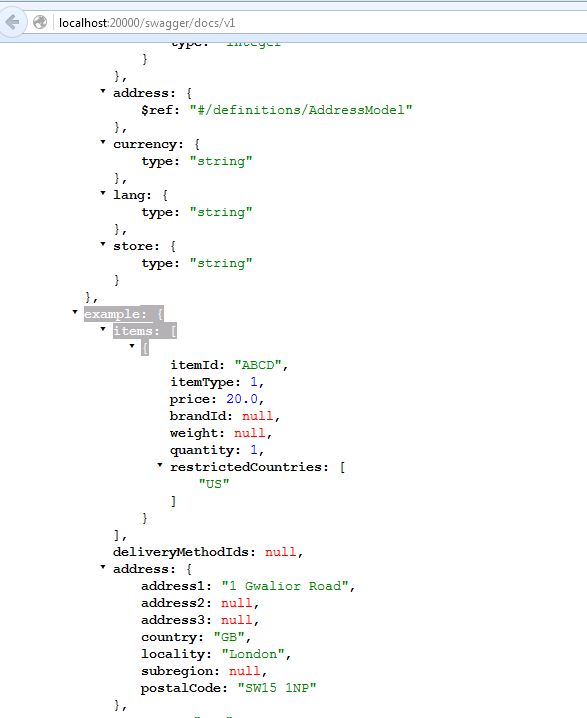
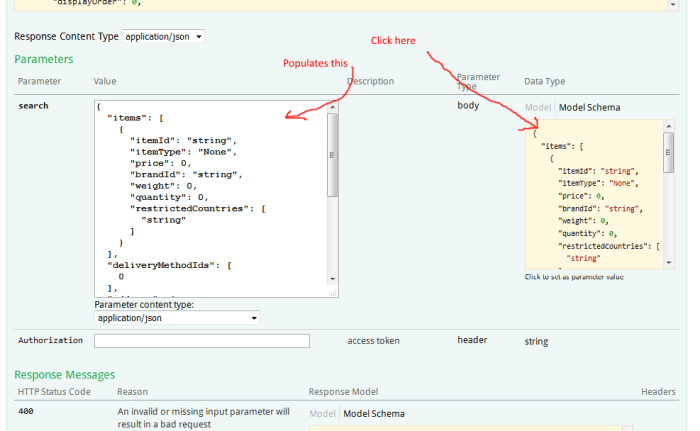
And the best part is, when you’re using swagger-ui (at /swagger/ui/index), now when you click the example request in order to populate the form, instead of getting an autogenerated request like this:
You’ll get your desired example, like this:
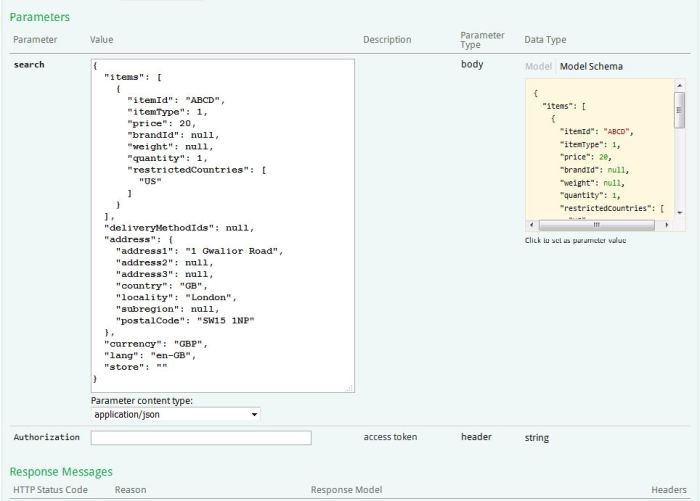
I find that having a valid request on hand is useful for smoke testing your API endpoints are working correctly.