Customize Blazor WASM sidebar per environment

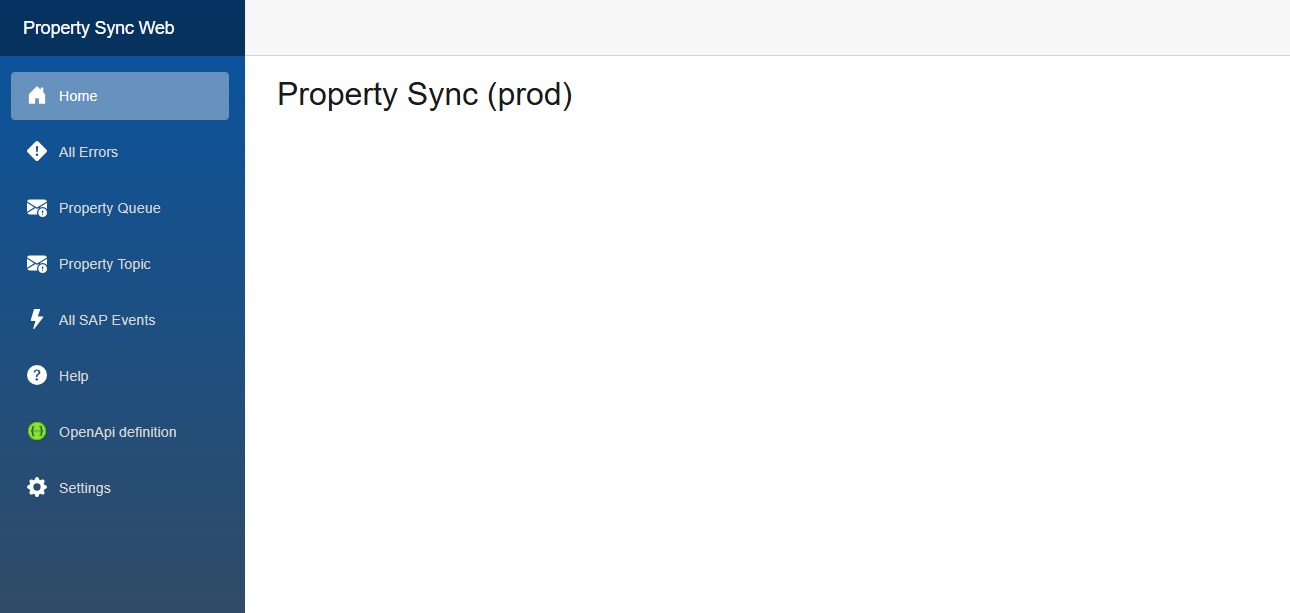
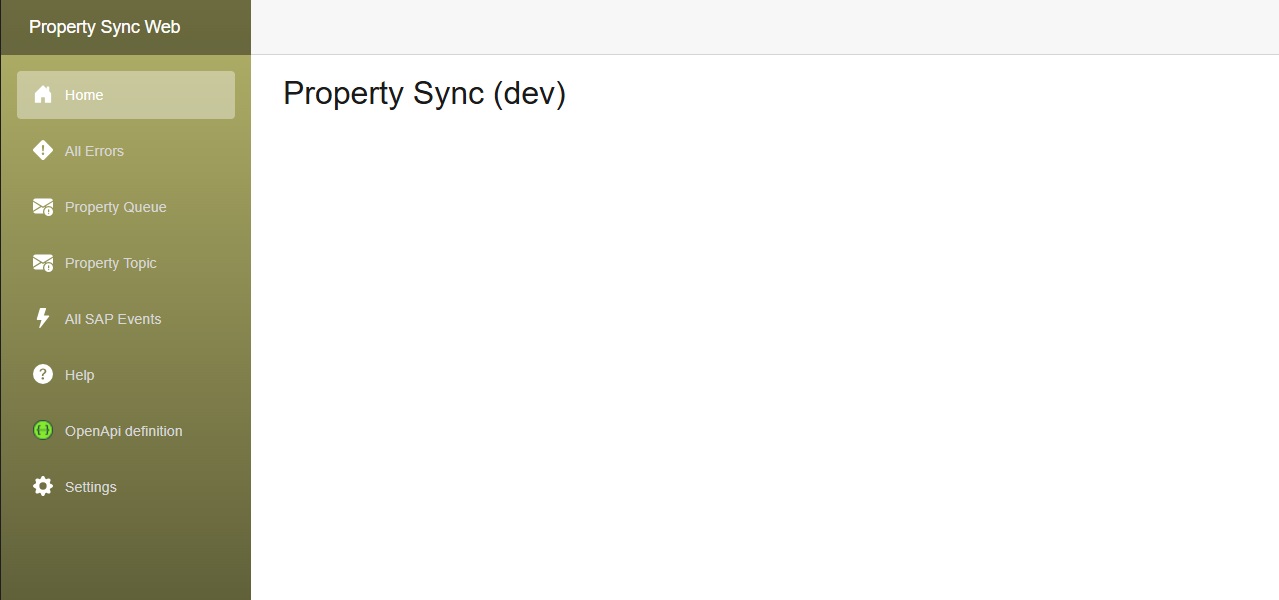
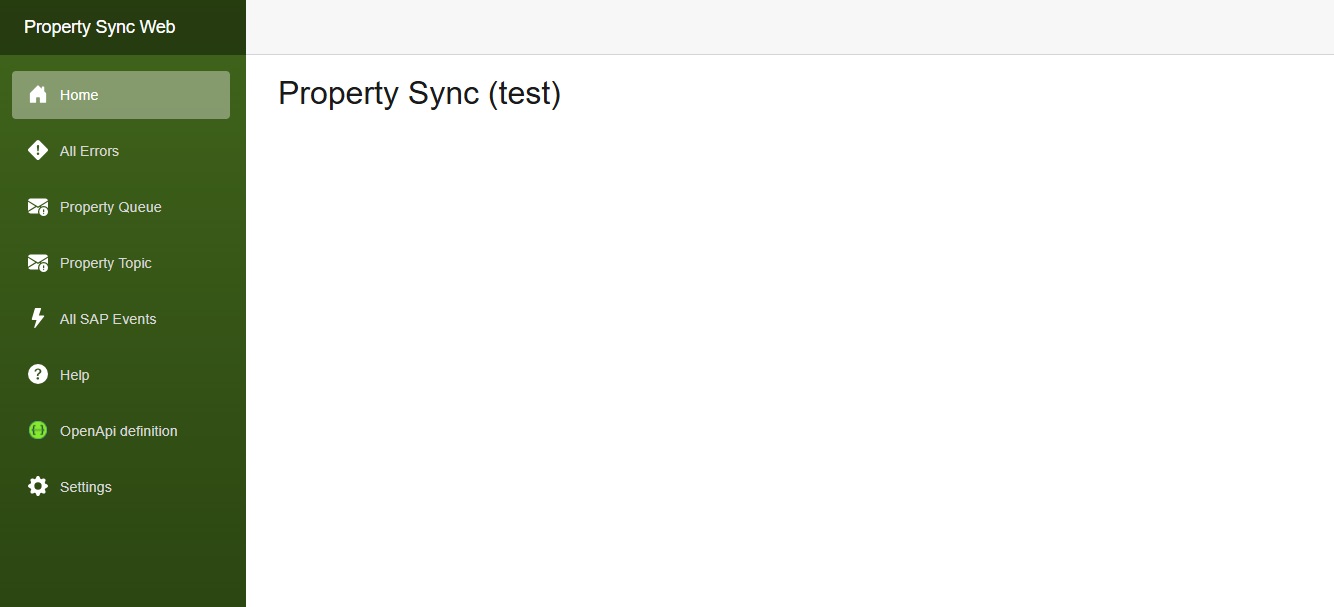
Our client wanted to have a slightly different color scheme for our internal application for each environment, i.e. dev, test and production.

I implemented this by injecting an IConfiguration which I wrote about in 2024.

The component we need to change is in MainLayout.razor, the div with class=”sidebar”.
I’m not sure how to change the css via code, or if it’s possible, so I used an inline style to the div.

MainLayout.razor:

@inherits LayoutComponentBase
@inject IConfiguration Configuration
<div class="page">
    <div class="sidebar" style="background-image: linear-gradient(180deg, @SidebarTopColor 0%, @SidebarBottomColor 70%);">
        <NavMenu />
    </div>
<FluentDialogProvider />
<FluentTooltipProvider />
<FluentMessageBarProvider />

@code {
    private string SidebarTopColor = "#052767"; // dark sapphire blue - these are the Blazor default colors
    private string SidebarBottomColor = "#3a0647"; // dark purple
    protected override void OnInitialized()
    {
        var environment = Configuration["Environment"]?.ToLowerInvariant() ?? "local";
        switch (environment)
        {
            case "dev":
                SidebarTopColor = "#b4b369"; // yellowy greeny
                SidebarBottomColor = "#545432"; // dark olive green
                break;
            case "test":
                SidebarTopColor = "#40651b"; // greenish
                SidebarBottomColor = "#294211"; // dark green
                break;
            case "prod":
                SidebarTopColor = "#0854A0"; // victoria blue
                SidebarBottomColor = "#354a5f"; // dark blue grey
                break;
        }
    }
}
Remove a secret from your local git commit history

I was recently trying to push some code to Azure DevOps, but I was getting an error:

$ git push
Enumerating objects: 117, done.
Counting objects: 100% (107/107), done.
Delta compression using up to 12 threads
Compressing objects: 100% (66/66), done.
Writing objects: 100% (69/69), 10.28 KiB | 1.28 MiB/s, done.
Total 69 (delta 42), reused 0 (delta 0), pack-reused 0
remote: Analyzing objects... (69/69) (105 ms)
remote: Validating commits... (5/5) done (2 ms)
remote: Checking for credentials and other secrets... done (906 ms)
error: remote unpack failed: error VS403654: The push was rejected because it contains one or more secrets.
To https://dev.azure.com/xxx/Software/_git/Property.Sync
! [remote rejected] feature/teams-logging -> feature/teams-logging (VS403654: The push was rejected because it contains one or more secrets.

Resolve the following secrets before pushing again. For help, see https://aka.ms/advancedsecurity/secret-scanning/push-protection.

Our Azure DevOps repository has GitHub Advanced Security enabled, hence the above error. Pretty cool feature.

The code I’m pushing doesn’t have the secret in it anymore – an early POC commit had the secret in, when I was playing around to see if I could get it to work. But then I removed the secret once I’d gotten it working.

The suggested fix is to muck around with git rebase and remove the secret from the older commit. Since I don’t care about intermediate commits in my feature branches, an easier workaround is to squash all commits in the branch, thus removing the secret from the history.

As usual with git, there’s a million different and confusing ways to do the same thing. I usually go for the simplest method. Here’s how I did it:

  1. create a new branch based off develop and switch to it git checkout -b feature/my-new-branch
  2. Squash merge all of the commits in my feature branch into the new branch git merge --squash feature/my-old-branch
  3. Commit and push my new branch (so that I can create a pull request into develop branch)

“When a Teams webhook request is received” not working from C# HttpClient

I was recently trying to send a message from my application (an Azure Function) to a Teams channel.

The current recommended way (by Microsoft) to do this is via a “Teams Workflow”, which is layer over top of Microsoft Power Automate, which is a layer over Logic apps.

Here’s my Teams Workflow:

Here’s the same Teams Workflow in Power Automate:

Here’s a slightly different one, which I wrote as an Azure Logic App. Here the first step is “When a HTTP request is received”:

In both cases, I was able to trigger the Power Automate / Logic app fine from Postman, but when I tried from C# code using HttpClient.PostJsonAsync it failed.

The only difference I could see between the Postman request and the HttpClient request was that HttpClient was sending a transfer-encoding=chunked header.

I re-wrote my code to use PostAsync instead, and then it worked fine.


using HttpClient client = new();
client.DefaultRequestHeaders.Accept.Clear();
client.DefaultRequestHeaders.Accept.Add(new MediaTypeWithQualityHeaderValue("application/json"));

var card = AdaptiveCard.ExceptionCard("parcel.changed.v1", "I800100081376", "dev", new InvalidOperationException());

var url = "https://prod-31.australiasoutheast.logic.azure.com:443/workflows/dda945b5337d48....";

// await client.PostAsJsonAsync(url, card); // this sends a transfer-encoding=chunked header, which Power Automate & Logic Apps doesn't handle

var json = JsonSerializer.Serialize(card);
var content = new StringContent(json, System.Text.Encoding.UTF8, "application/json");
await client.PostAsync(url, content);

Logging to Application Insights with ILogger in Azure functions on .NET 8

Today I couldn’t figure out why any of my ILogger messages in my Azure Function weren’t appearing in Application Insights. According to my research they should appear as Trace messages.

logger.LogInformation("Message ID: {id}", message.MessageId);


I tried various Log Level tweaks to host.json to no avail.

Fortunately one of my colleagues (hi Ivan!) had previously had the same issue, and he’d already found the fix, which is documented here.

Turns out that dotnet-isolated Functions work a bit differently.


var host = new HostBuilder()
    .ConfigureFunctionsWebApplication()
    .ConfigureServices((context, services) =>
    {
        services.AddApplicationInsightsTelemetryWorkerService();
        services.ConfigureFunctionsApplicationInsights();
    })
    .ConfigureLogging(logging =>
    {
        logging.Services.Configure<LoggerFilterOptions>(options =>
        {
            // https://learn.microsoft.com/en-us/azure/azure-functions/dotnet-isolated-process-guide?tabs=windows#managing-log-levels
            // By default, the Application Insights SDK adds a logging filter that instructs the logger to capture only warnings and more severe logs.
            // To disable this behavior, remove the filter rule as part of service configuration:
            var defaultRule = options.Rules.FirstOrDefault(rule => rule.ProviderName == "Microsoft.Extensions.Logging.ApplicationInsights.ApplicationInsightsLoggerProvider");
            if (defaultRule is not null)
            {
                options.Rules.Remove(defaultRule);
            }
            // Set log level to Information so that we don't log traces
            var loggingRule = new LoggerFilterRule("PropertySync", null, LogLevel.Information, null);
            options.Rules.Add(loggingRule);
        });
    })
    .Build();

azure application insights

A nicer free Blazor WASM Data grid, toast, and confirm

A Blazor WASM .NET 8 proof-of-concept project I recently worked needed a data grid.

  • MudBlazor, at the time, it didn’t support .NET 8 WASM. (It might now, I’m not sure).
  • Blazorise – looks good, but I didn’t want the client to pay, because it’s a POC.
  • QuickGrid – used this for the initial version. Easy to use, but needs CSS skills to customize.
  • FluentDataGrid – much prettier, and easier to use than the QuickGrid. Almost a drop-in replacement for the QuickGrid.

QuickGrid

I initially started out with QuickGrid. After tweaking the CSS to get the column widths right, the result was this:

I would have liked the text to overflow … and show the full text on hover. I played around with the CSS and it kinda worked, but it wasn’t great.

FluentDataGrid

Later I found the FluentDataGrid, which is part of FluentUI Blazor. It already has the overflow with tooltip:

Dialog

You would think that Blazor would have a built-in easy way to popup a confirm message to the user, but it doesn’t come with any. The only way I could find was to use an old-fashioned javascript confirm:


bool confirmed = await JsRuntime.InvokeAsync<bool>("confirm", $"Are you sure you want to resend {loggedEvent.MessageBody}?");
if (confirmed)
{

// do stuff

Which is pretty basic.

FluentUI Blazor’s dialog is a bit prettier:


var dialog = await _dialogService.ShowConfirmationAsync($"Are you sure you want to resend {loggedEvent.EventType} for {loggedEvent.Id}?");
var result = await dialog.Result;

if (!result.Cancelled)
{

// do stuff

Notifications

FluentUI Blazor also has a ToastService for easily showing a pop-up (like how toast pops-up when it’s ready) to notify users.


_toastService.ShowSuccess($"{loggedEvent.Id} was resent.");


Add authentication to an Azure Static Web App’s API

At my current client we are writing a Blazor WASM app which is deployed as a Static Web App. The backend is an Azure Function which is deployed as a “Bring your own” function, however I think this still applies if the backend is a Managed Function.

The static web app is hosted in Azure at https://calm-ocean.33.azurestaticapps.net/. All of it’s pages are protected with OAuth on Microsoft Entra ID (formerly Azure AD).

The API is an Azure function with an HTTP endpoint at say https://my-func.azurewebsites.net/api/blogs.

At first this endpoint had no authentication, meaning it can be called directly and return a 200.

I then linked the Static Web App to the Azure function, which adds an “Azure Static Web Apps” Identity provider to the Azure Function, which means only the Static Web app can call the Function.

Azure portal screenshot

After linking, if I try call my function endpoint at https://my-func.azurewebsites.net/api/blogs it now returns a 400 (it should probably return a 401).

The security hole

The Static Web App (https://calm-ocean.33.azurestaticapps.net/) proxies any calls to the function’s endpoints at https://calm-ocean.33.azurestaticapps.net/api.

This means that by default, unauthenticated users can still call the API but via the Static Web App, i.e. https://calm-ocean.33.azurestaticapps.net/api/blogs – even though all other pages are protected by OAuth! Which is a big security hole 😱

The fix

The fix is quite simple. Specify that all routes should be locked down in the staticwebapp.config.json file (except our Blazor authentication pages):

{
 "routes": [
    {
      // Our Blazor pages have authentication via the [Authorize] attribute (in _Imports.razor).
      // Blazor's auth routes are at authentication/*, so allow anonymous access to them.
      // FYI, Azure Static Web App's built-in auth is at .auth/
      "route": "authentication/*",
      "allowedRoles": [ "anonymous" ]
    },
    {
      // Our API is an Azure function which is proxied on the "api" route. We don't want to allow anonymous access! We need to specify that calls to api/* are authenticated.
      // Let's lock down the whole site, so that requests to any page will need SWA auth, which is then passed on to our api/* calls.
      "route": "/*",
      "allowedRoles": [ "authenticated" ]
    }
  ],
  "responseOverrides": {
    "401": {
      "statusCode": 302,
      "redirect": "/.auth/login/aad"
    }
  }
}

Once deployed to Azure, if you try call the API directly (i.e. in an incognito browser window), you’ll be redirected to login.
One obvious gotcha is that this won’t work when you’re debugging locally, because your local function will be on a completely different port and isn’t proxied.

Pro tip: if you’re having trouble getting this to work, you can navigate to /.auth/me on your Static Web App to see the information about the currently logged in user. If you don’t see anything then you can sign in at /.auth/login/aad. These .auth routes are built-in to Azure Static Web Apps.

PS. after figuring all this out, I found this page which is a thorough treatment of how to combine Azure Static Web App’s authentication with Blazor WASM. Personally I haven’t needed to go that far myself – I’m so far only using the guides I’ve linked to above to do Blazor authentication.

C# interpolate a raw JSON string

It’s sometimes handy (e.g, in test suites) to have a JSON string hardcoded. If you want to interpolate it to insert a variable, use $$””” and then {{ }}.

In this example my interpolation expression is the variable ratingUnitNumber:


var ratingUnitNumber = "test";
var cloudEvent = $$"""
{
  "id": "5565db35-01a9-4596-b611-9b26d2210c6e",
  "source": "https://s4h-dev.blah.govt.nz",
  "type": "nz.govt.blah.s4.ratingunitchanged",
  "subject": "blah",
  "data": {
  "ratingUnits": [
    {
      "ratingUnitNumber": "{{ratingUnitNumber}}"
    }]
  },
  "time": "2024-03-11T23:09:27.5683052+00:00",
  "specversion": "1.0"
}
""";

Hopefully that helps someone.

Add icons to Blazor’s NavMenu in .NET 8

The default Blazor navigation menu is in NavMenu.razor. Its CSS is in NavMenu.razor.css, and contains such exciting classes as bi-plus-square-fill-nav-menu and bi-house-door-fill-nav-menu.

These are all Bootstrap Icons. Here I’ll show you how to add another Bootstrap icon to the NavMenu.

I’m going to add the “Envelope exclamation fill” icon. From the Bootstrap page, copy the SVG code to your clipboard, e.g.

<svg xmlns="http://www.w3.org/2000/svg" width="16" height="16" fill="currentColor" class="bi bi-envelope-exclamation-fill" viewBox="0 0 16 16">
  <path d="M.05 3.555A2 2 0 0 1 2 2h12a2 2 0 0 1 1.95 1.555L8 8.414zM0 4.697v7.104l5.803-3.558zM6.761 8.83l-6.57 4.026A2 2 0 0 0 2 14h6.256A4.5 4.5 0 0 1 8 12.5a4.49 4.49 0 0 1 1.606-3.446l-.367-.225L8 9.586zM16 4.697v4.974A4.5 4.5 0 0 0 12.5 8a4.5 4.5 0 0 0-1.965.45l-.338-.207z"/>
  <path d="M12.5 16a3.5 3.5 0 1 0 0-7 3.5 3.5 0 0 0 0 7m.5-5v1.5a.5.5 0 0 1-1 0V11a.5.5 0 0 1 1 0m0 3a.5.5 0 1 1-1 0 .5.5 0 0 1 1 0"/>
</svg>

We’re gonna need to URL encode the above. Paste the above into Notepad, and then Ctrl-H to replace:

currentColor with white
" with '
< with %3C
> with %3E
and remove all new lines
which should give you
%3Csvg xmlns='http://www.w3.org/2000/svg' width='16' height='16' fill='white' class='bi bi-envelope-exclamation-fill' viewBox='0 0 16 16'%3E%3Cpath d='M.05 3.555A2 2 0 0 1 2 2h12a2 2 0 0 1 1.95 1.555L8 8.414zM0 4.697v7.104l5.803-3.558zM6.761 8.83l-6.57 4.026A2 2 0 0 0 2 14h6.256A4.5 4.5 0 0 1 8 12.5a4.49 4.49 0 0 1 1.606-3.446l-.367-.225L8 9.586zM16 4.697v4.974A4.5 4.5 0 0 0 12.5 8a4.5 4.5 0 0 0-1.965.45l-.338-.207z'/%3E%3Cpath d='M12.5 16a3.5 3.5 0 1 0 0-7 3.5 3.5 0 0 0 0 7m.5-5v1.5a.5.5 0 0 1-1 0V11a.5.5 0 0 1 1 0m0 3a.5.5 0 1 1-1 0 .5.5 0 0 1 1 0'/%3E%3C/svg%3E

Now open the NavMenu.razor.css and copy one of the existing styles such as .bi-list-nested-nav-menu and give it a new name, such as .bi-envelope-fill-nav-menu. Paste in the above after “data:image/svg+xml,”.

.bi-envelope-fill-nav-menu {
    background-image: url("data:image/svg+xml,%3Csvg xmlns='http://www.w3.org/2000/svg' width='16' height='16' fill='white' class='bi bi-envelope-exclamation-fill' viewBox='0 0 16 16'%3E%3Cpath d='M.05 3.555A2 2 0 0 1 2 2h12a2 2 0 0 1 1.95 1.555L8 8.414zM0 4.697v7.104l5.803-3.558zM6.761 8.83l-6.57 4.026A2 2 0 0 0 2 14h6.256A4.5 4.5 0 0 1 8 12.5a4.49 4.49 0 0 1 1.606-3.446l-.367-.225L8 9.586zM16 4.697v4.974A4.5 4.5 0 0 0 12.5 8a4.5 4.5 0 0 0-1.965.45l-.338-.207z'/%3E%3Cpath d='M12.5 16a3.5 3.5 0 1 0 0-7 3.5 3.5 0 0 0 0 7m.5-5v1.5a.5.5 0 0 1-1 0V11a.5.5 0 0 1 1 0m0 3a.5.5 0 1 1-1 0 .5.5 0 0 1 1 0'/%3E%3C/svg%3E");
}

Now you can use the bi-envelope-fill-nav-menu class in the NavMenu.razor:

<div class="nav-item px-3">
    <NavLink class="nav-link" href="rating-unit-dead-letter">
        <span class="bi bi-envelope-fill-nav-menu" aria-hidden="true"></span> Rating Unit Dead Letter
    </NavLink>
</div>

And here it is:

Add secrets.json to an Azure Function

I was surprised to see that .NET 8 Azure functions don’t include support for ASP.NET’s Secret Manager aka User secrets aka secrets.json out of the box.

Out of the box you get this:

var host = new HostBuilder()
    .ConfigureFunctionsWorkerDefaults()
    .ConfigureServices(services =>
    {
        services.AddApplicationInsightsTelemetryWorkerService();
        services.ConfigureFunctionsApplicationInsights();
    })
    .Build();

host.Run();

To add user secrets, you’ll need to install the Microsoft.Extensions.Configuration.UserSecrets NuGet package, and then call .ConfigureAppConfiguration(), like so:

var host = new HostBuilder()
    .ConfigureFunctionsWorkerDefaults()
    .ConfigureAppConfiguration((hostContext, config) =>
    {
        if (hostContext.HostingEnvironment.IsDevelopment())
        {
            config.AddJsonFile("local.settings.json");
            config.AddUserSecrets<Program>();
        }
    })
    .ConfigureServices(services =>
    {
        services.AddApplicationInsightsTelemetryWorkerService();
        services.ConfigureFunctionsApplicationInsights();
    })
    .Build();

host.Run();

Edit: According to this page, User secrets are supported in Azure Functions Core Tools (version 3.0.3233 or later) – so maybe the above isn’t needed any more.